

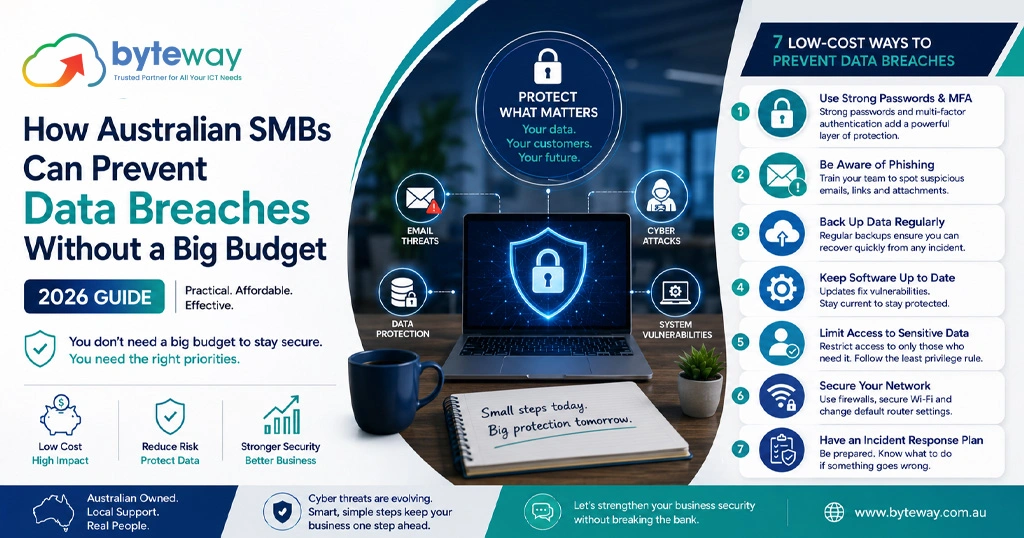
Byteway helps Australian small businesses protect themselves from data breaches without spending like a corporate, and the encouraging truth is that most breaches are prevented by cheap, ordinary controls rather than expensive tools. In a year when Australian data breach reports hit record highs, the businesses getting hurt are usually the ones that skipped the basics, not the ones that could not afford a fancy security platform. This guide covers the affordable, high-impact steps that stop most attacks.
The honest headline is this: you do not need a big budget to prevent most breaches, you need the fundamentals done properly. Multi-factor authentication, tested backups, staff awareness, patching, strong passwords and a simple response plan prevent the large majority of common attacks, and most of them cost little or nothing. Expensive security tools have their place, but they are not what stands between a typical small business and a breach.
Why the basics matter more than the budget?
Most breaches are not sophisticated. They start with a stolen or guessed password, a staff member clicking a convincing email, or an unpatched system that attackers scanned and found. Australian scam and breach data consistently shows phishing and credential theft as the leading ways in. That is good news for a small business, because the defences against these are cheap. You do not need to outspend attackers. You need to close the ordinary doors they actually use.
Step 1: Turn on multi-factor authentication (free, highest impact)
If you do one thing, do this. Multi-factor authentication means a stolen password alone is not enough to get in, and since stolen passwords start most breaches, it is the single highest-value control available. It is built into Microsoft 365, Google Workspace and most business tools at no extra cost. Turn it on for email, finance systems and remote access first.
Step 2: Back up your data, and test the restore (low cost)
A tested backup is the difference between shrugging off ransomware and losing your business. The key word is tested: a backup nobody has ever restored is a hope, not a safety net. Cloud backup for a small business is inexpensive, and restoring it once to confirm it works costs nothing but time.
Step 3: Train your people (cheap, and it works)
Your staff are the front line, and a short session on spotting phishing and verifying unusual requests prevents the compromise that starts most breaches. This is one of the cheapest and most effective things you can do. Make it normal to question a suspicious email and to verify payment changes by phone, and tell staff they will never be in trouble for checking.
Step 4: Keep systems patched and updated (free)
Attackers scan for known vulnerabilities that already have fixes available. Applying updates promptly, to your operating systems, software and especially anything internet-facing, closes the holes they look for. This is free and one of the most neglected basics, as recent ACSC alerts have shown.
Step 5: Use strong, unique passwords with a password manager (low cost)
Reused passwords mean one breach unlocks everything. A password manager, a few dollars per user a month, lets staff use strong, unique passwords without memorising them. Combined with MFA, it closes off the credential-based attacks that dominate the breach statistics.
Step 6: Control who can access what (free)
Give people access to what they need and no more, and remove access promptly when someone leaves. Shared logins and lingering access from departed staff are common, avoidable weaknesses. This costs nothing but attention and discipline.
Step 7: Have a simple response plan (free)
If something does go wrong, knowing what to do in the first hour limits the damage enormously. A one-page plan, who to call, who decides, what to disconnect, and where your data lives, is free to produce and invaluable on the day. For businesses covered by the Privacy Act, it also helps you meet breach notification obligations.
The Essential Eight, on a budget
Many of these steps map to the Essential Eight, the Australian Signals Directorate’s baseline of mitigation strategies. You do not have to implement all of it at once, and the foundational levels are largely about doing ordinary things consistently: patching, MFA, backups, restricting admin access. Working towards the Essential Eight is a structured, credible way to improve security affordably, and to show you took reasonable steps if you are ever asked.
Byteway Expert Insight
The most expensive security mistake a small business makes is assuming security is expensive. That belief leads to doing nothing, which is what attackers count on. In reality, the controls that would have prevented most of the breaches we see cost very little: turning on MFA, testing a backup, briefing staff, patching, and writing a one-page plan. The businesses that get breached are rarely the ones that could not afford protection. They are the ones that assumed they could not, and so skipped the free and cheap fundamentals. Our advice to any small business on a tight budget is to do the basics properly first. They stop most attacks, and they cost a fraction of what a breach does.
How Byteway helps?
- We run a security health check to find your gaps and prioritise the cheapest high-impact fixes.
- We set up MFA, tested backups, access control and patching without an enterprise budget.
- We help you work towards the Essential Eight and connect it to affordable managed IT and cyber security.
Protect your business without breaking the budget
Byteway helps Australian SMBs prevent data breaches with affordable, high-impact security. Book a low-cost security health check. 👉 Book your health check
FAQs
Can a small business prevent data breaches on a tight budget?
Yes. Most breaches are stopped by cheap fundamentals, MFA, tested backups, staff training, patching and strong passwords, not expensive tools. Byteway helps Australian SMBs put these in place affordably and prioritise the highest-impact fixes first.
What is the single most important security step?
Multi-factor authentication. It is free, built into most business tools, and it stops the stolen-password attacks that begin most breaches. Byteway turns it on across email, finance and remote access as a first move.
How much should a small business spend on cyber security?
There is no fixed figure, but the highest-value controls are inexpensive or free. Fund the fundamentals first, then add more as needed. The cost of a breach far exceeds the cost of prevention, and Byteway can show you where a small budget goes furthest.
What is the Essential Eight?
The Australian Signals Directorate’s baseline of eight mitigation strategies. Its foundational levels are largely ordinary practices done consistently, patching, MFA, backups, restricting admin, and Byteway helps small businesses work towards it affordably.
Do I need to train my staff?
Yes, and it is one of the cheapest, most effective steps. A short session on spotting phishing and verifying unusual requests prevents the compromises that start most breaches. Byteway can run this awareness training for your team.
What should I do if we have a breach?
Contain it, follow your response plan, and if it is likely to cause serious harm, assess and notify under the Notifiable Data Breaches scheme. Having a one-page plan beforehand is decisive, and Byteway helps small businesses prepare one.
